Java Series #12: JSP
JSP Essentials: Syntax, Lifecycle, JSTL, Sessions & Cookies

JavaServer Pages (JSP) is a server-side technology used to build dynamic web pages. Internally, every JSP is converted into a Servlet, which is why understanding JSP syntax and lifecycle is critical.
JSP Syntax Tags Explained
<%= %> — Expression Tag
Used to output data directly to the response.
<%= username %>
Equivalent to:
out.print(username);
<% %> — Scriptlet
Used to write Java logic inside JSP.
<%
int count = 10;
System.out.println(count);
%>
Avoid heavy logic here — it hurts readability and maintainability.
<%! %> — Declaration
Used to declare methods or variables at class level.
<%!
int add(int a, int b) {
    return a + b;
}
%>
These become part of the generated servlet class.
<%@ %> — Directive
Used for configuration and settings.
<%@ page contentType="text/html" %>
<%@ include file="header.jsp" %>
JSP vs Servlets
| Aspect | JSP | Servlet |
| Purpose | View layer | Controller / Backend logic |
| Syntax | HTML + tags | Pure Java |
| Readability | High | Low |
| Lifecycle | Converted to Servlet | Direct execution |
| Best Use | UI rendering | Request handling |
JSP focuses on presentation, Servlets handle request processing.
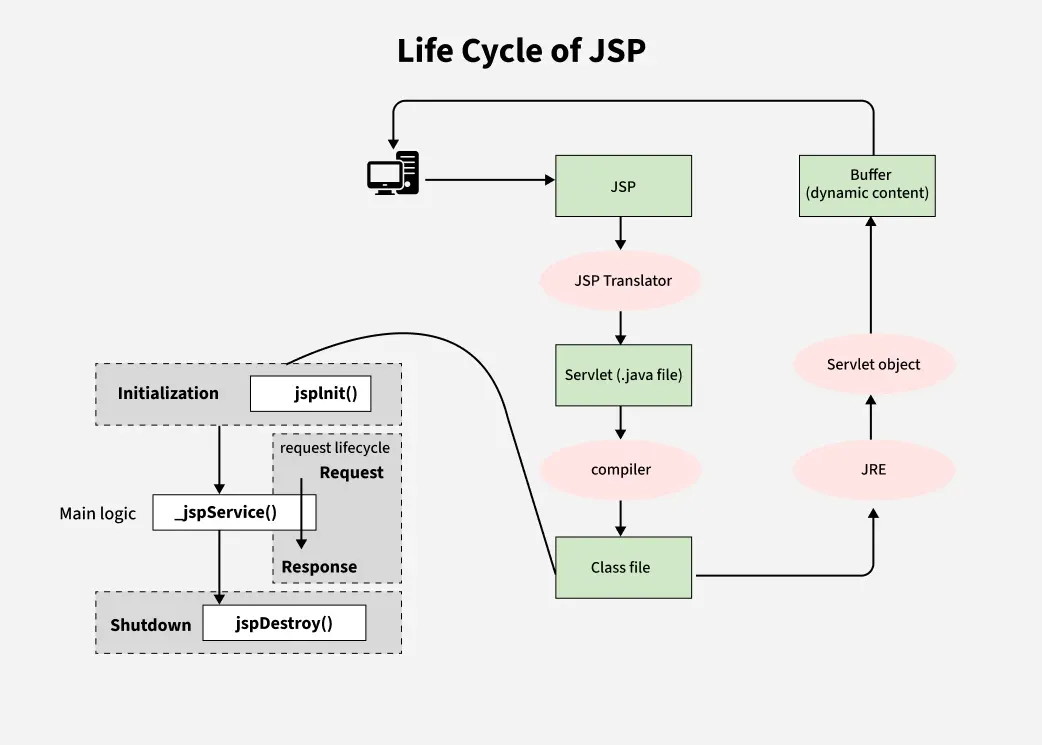
JSP Lifecycle Explained
Internally, JSP follows this lifecycle:
Translation
JSP is converted into a Servlet (.java file)Compilation
Servlet is compiled into.classClass Loading
JVM loads the servlet classInstantiation
Servlet object is createdInitialization
jspInit()is called onceRequest Processing
_jspService()handles every requestDestruction
jspDestroy()is called before unloading
Key point: _jspService() is called for every request, others only once.
JSTL Core Tags
JSTL removes Java code from JSP and makes pages cleaner.
Variable Handling
<c:set var="name" value="John" scope="session" />
<c:remove var="name" />
Output
<c:out value="${user}" default="Guest" />
Loops
<c:forEach var="item" items="${list}">
    ${item}
</c:forEach>
Conditional Logic
<c:if test="${age > 18}">
    Adult
</c:if>
<c:choose>
  <c:when test="${role == 'admin'}">Admin</c:when>
  <c:otherwise>User</c:otherwise>
</c:choose>
URL & Redirect
<c:url value="/login.jsp" />
<c:redirect url="home.jsp" />
Exception Handling
<c:catch var="error">
   ${1 / 0}
</c:catch>
Expression Language (EL)
Used to access request, session, and application data.
${param.name}
${sessionScope.user}
${requestScope.data}
EL keeps JSP declarative and readable.
Session Tracking in Servlets
HTTP is stateless, so session tracking is required.
Mechanisms
Cookies: Small key–value data stored in the user’s browser and sent with every request to help identify the user across multiple requests.
Hidden Form Fields: Session data is stored inside invisible form inputs and sent back to the server only when the form is submitted.
URL Rewriting: Session information (like a session ID) is appended to the URL when cookies are disabled, allowing the server to track the user.
HttpSession: Server-side storage that maintains user-specific data across multiple requests using a unique session ID.
Cookies vs Sessions
| Feature | Cookies | Sessions |
| Storage | Client-side | Server-side |
| Security | Less secure | More secure |
| Size | 4KB limit | Large |
| Expiry | Manual | Auto / invalidate |
| Persistence | Can survive browser close | Lost on expiry |
| Usage | JWT, preferences | Login sessions |
HttpSession Interface
Create / Fetch Session
HttpSession session = request.getSession();
true→ create if not exists (default)false→ return null if not exists
Store & Retrieve Data
session.setAttribute("user", userObj);
session.getAttribute("user");
session.removeAttribute("user");
Session Timeout
session.setMaxInactiveInterval(100);
(Time in seconds)
Destroy Session (Logout)
session.invalidate();
Key Takeaways
JSP is not separate from Servlets — it compiles into one
Avoid scriptlets, prefer JSTL + EL
Sessions are server-side and safer than cookies
JSP is best for views, Servlets for control logic
Thanks to gfg!


