
Platform Independence
Java is platform-independent, meaning code written once can run anywhere.
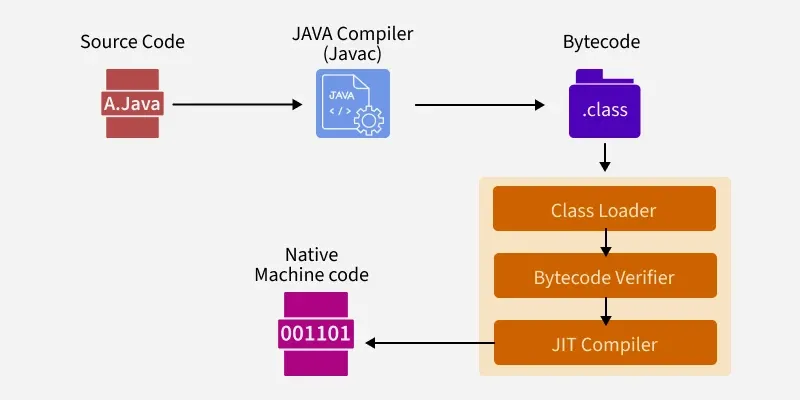
The source code (
.java) is compiled into bytecode (.class), which runs on the Java Virtual Machine (JVM).The JVM translates bytecode into machine-specific instructions using the Just-In-Time (JIT) compiler at runtime.
Why Java
Simple and secure
Statically typed (types checked at compile time)
No operator overloading
No explicit pointer manipulation
Two-Step Execution Process
1. Compilation (Source Code → Bytecode)
Handled by the Java Compiler (javac), which goes through several internal phases:
Parsing – Converts source code into an Abstract Syntax Tree (AST).
Entering – Populates symbol tables for classes, methods, and variables.
Annotation Processing – Handles annotations like
@Overrideor custom ones.Attribution – Performs type checking and name resolution.
Flow Analysis – Ensures variables are initialized and code is reachable.
Desugaring – Removes syntactic sugar (like for-each loops) into simpler code.
Generation – Produces
.classfiles (bytecode).
2. Execution (Bytecode → Machine Code via JVM)
2.1 Class Loader
Loads required classes into memory.
Primordial Loader: Default system class loader.
Non-Primordial Loader: Custom loaders for advanced class loading control.
Example:
Class r = loadClass(String className, boolean resolveIt);
2.2 Bytecode Verifier
Ensures that the bytecode is safe before execution:
Checks variable initialization
Validates method signatures
Enforces access modifiers (e.g., private, protected)
Prevents stack overflow and memory corruption
2.3 Just-In-Time (JIT) Compiler
Converts bytecode to native machine code at runtime for better performance.
Caches frequently executed code for optimization.
Variables in Java
Types of Variables
Static variables – Shared among all instances of a class.
Instance variables – Belong to a specific object.
Local variables – Declared inside a method or block (cannot use access specifiers).
Note: Accessing a static variable through an object reference gives a compiler warning, but it will still work — the compiler automatically replaces the object name with the class name.
Common String Mistake
==compares references (memory locations)..equals()compares content.String a = "Hello"; String b = new String("Hello"); System.out.println(a == b); // false System.out.println(a.equals(b)); // true
Naming & Data Types
Use camelCase for variable names.
Example:int studentCount;Data Types
Primitive – int, float, char, boolean, etc.
Non-primitive – String, Arrays, Classes, Interfaces, etc.
Strings in Java are not null-terminated (unlike C/C++).
Type Casting
Widening (Implicit / Upcasting)
- Conversion from smaller to larger container type.
Example:int → long → float → double
Narrowing (Explicit / Downcasting)
- Conversion from larger to smaller type, requires explicit cast.
Example:double → float → long → int
Reference Casting
Upcasting: Reference of superclass refers to subclass object.
Downcasting: First upcast, then explicitly cast back to the subclass type.
Input/Output Streams
Java I/O is divided into two main categories:
Input Streams (reading data)
Output Streams (writing data)
Examples:
System.in– Standard input stream (usually keyboard).Wrapped inside classes like
Scanner(fromjava.util) to make input easier.
Example:
import java.util.Scanner;

Scanner sc = new Scanner(System.in);
int num = sc.nextInt();
System.out.println("You entered: " + num);


